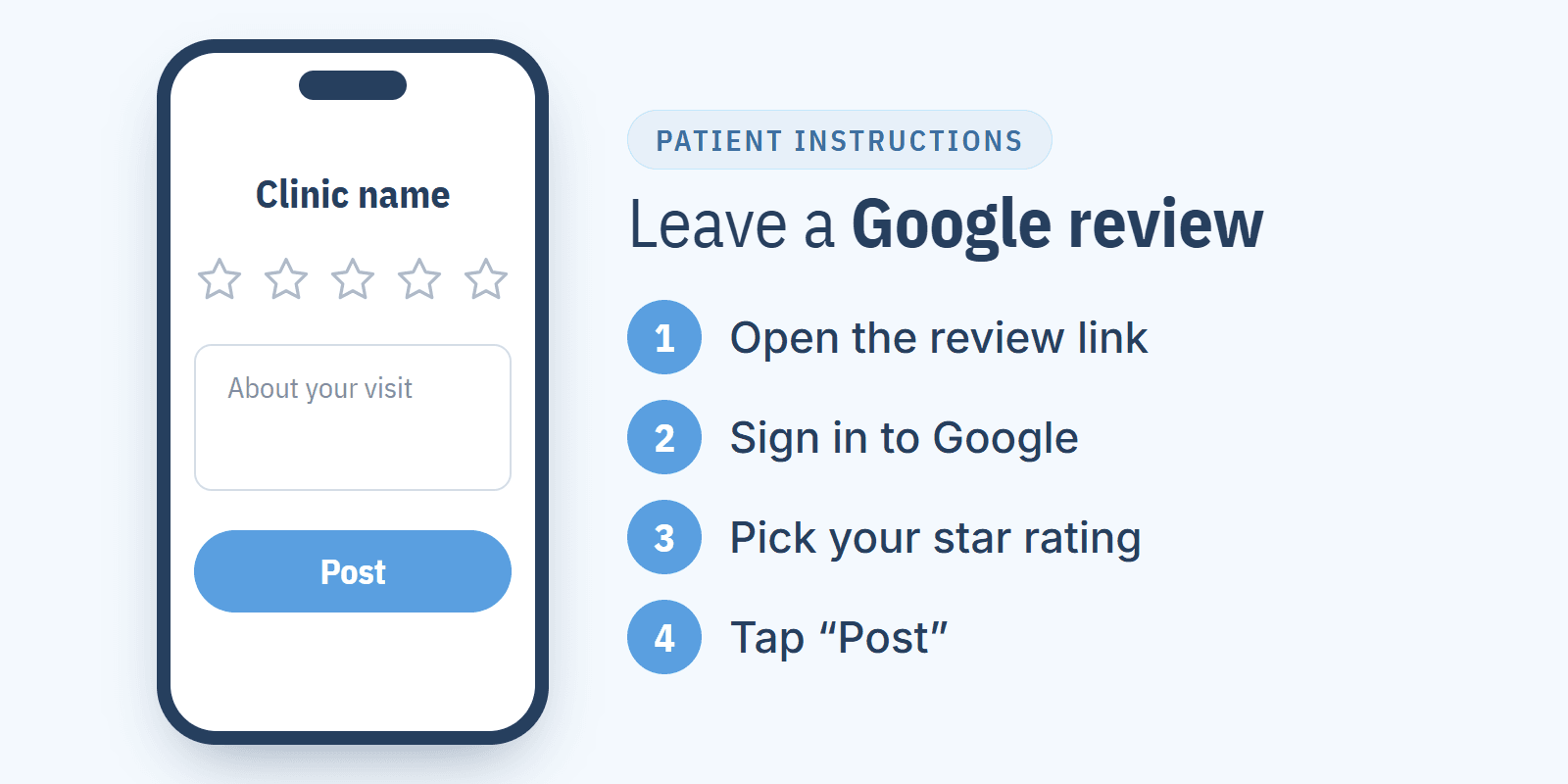
A patient leaves a Google review like this: they sign in to their Google account, find the clinic in Google Maps or Google Search, click "Write a review", pick the stars and post it. The whole thing takes a minute, as long as the patient has an account and lands on the right Business Profile. Those two things are exactly where patients get stuck most often.
That's why below you'll find ready-made instructions to send to patients and the reasons a review won't post or doesn't show up. I run Repto, which sends patients review requests by SMS, but the instructions work without us too. How clinics collect reviews day to day and what to do with them afterwards is covered in my guide to Google reviews for medical practices.
How do you leave a Google review on a phone?
The easiest way is the Google Maps app, which most Android phones come with and iPhone users can download from the App Store:
- 1.
The patient opens Google Maps and types in the clinic's name.
- 2.
They tap the clinic's name at the bottom of the screen to open its Business Profile.
- 3.
They go to the "Reviews" tab and tap the empty stars.
- 4.
They pick a rating, optionally write a few sentences and add photos.
- 5.
They tap "Post".
On a phone this route has one weak spot: searching by name. Someone who types in the doctor's name often ends up on the doctor's own profile, and someone who types just "clinic" and a street name may end up on a neighboring clinic's profile. A clinic gets around this by sending the patient a direct link to the review form: one tap opens the review form with the stars straight away, no searching. I show how to copy that link from your Business Profile and turn it into a QR code in my guide to the Google review link and QR code.
How do you leave a Google review on a computer?
On a computer there are two routes, and both end in the same window:
Through Google Search: the patient types in the clinic's name and town, and in the Business Profile panel (on the right or below the results) clicks "Write a review".
Through Google Maps (Google's instructions): the patient signs in, searches for the clinic, scrolls down to the reviews in the left panel and clicks "Write a review".
In that window they pick the stars, write the text, can add a photo with the camera button and click "Post". If they weren't signed in, Google asks them to sign in at that point.
Do you need a Google account to leave a review?
Yes. Only a signed-in user can leave a review, and Google doesn't accept anonymous reviews: the review shows the name from the author's Google profile (Google Maps Help).
The account doesn't have to be Gmail. A patient can create one with an email address they already use (Google Account Help). An older patient who says they "don't have Google" often has an account without knowing it, because without one they couldn't have downloaded a single app from the Google Play Store on an Android phone. In that case it's enough to open the review link on that phone, since the patient is usually already signed in.
How do you make it easier for older patients to leave a review?
What helps most is cutting the route down to one tap. An older patient will rarely work their way through search, tabs and stars on their own, but they will open a link from a text message or scan a QR code on a flyer. Yet I regularly see flyers with a link to the clinic's profile in Google Maps instead of the review form, so the patient still has to hunt for the button.
A few things that help:
The patient gets the link after the visit, at home, when they have time, not while queuing at the front desk.
The instructions are short and in writing, so the patient can come back to them later.
The patient leaves the review on their own phone, not on a tablet at reception or a staff member's phone. Reviews posted from the clinic's devices often get held by Google's filter, and a review from a staff member's account is a conflict of interest under Google's rules (Google Maps content policy).
A parent or carer leaves the review about a child's or an elderly parent's visit from their own account, because they were at the visit and they're the one describing it.
Ready-made instructions to send to patients
The text below works in an email, on the clinic's website or on the back of a flyer with a QR code. The parts in square brackets are for you to fill in:
How to leave a Google review for [clinic name]
Step 1. Open this link: [review link]. You can also scan the QR code on the flyer with your phone's camera.
Step 2. If Google asks you to sign in, sign in to your Google account. On an Android phone this is usually the account you use for the Google Play Store.
Step 3. Choose your star rating and, if you like, write a few sentences about your visit.
Step 4. Click "Post".
Don't have a Google account? You can create one for free at accounts.google.com, also with an email address that isn't Gmail.
Thank you. Every review helps other patients choose a doctor.
The instructions don't ask for five stars, and that's how it should stay. Google's rules forbid encouraging only positive reviews and offering anything in return for a review, and Google removes reviews that break these rules (Google Maps content policy). The text messages and flyer wording that work for Repto's clients are collected in my review request templates.
Why can't I leave a Google review?
A patient usually can't leave a review for one of 5 reasons:
- 1.
The patient isn't signed in. The "Write a review" button then leads to a sign-in screen first, which some people take for an error and close.
- 2.
They're signed in to a work or school account. The admin of such an account can switch off some Google services. Switching to a personal account helps.
- 3.
The Google Maps app is out of date. After an update from the app store the button usually comes back.
- 4.
Google has restricted reviews on the profile. When a lot of content that breaks the rules appears on a profile, Google may temporarily pause new reviews (Google Business Profile policy). Then nobody can add one, and the clinic can only wait.
- 5.
The patient's account is restricted, for example blocked for earlier violations. That's between the patient and Google.
Reception can sort out the first three over the phone in a minute. The clinic has no control over the last two, so there's no point spending time on them.
Why doesn't a patient's review show up on the profile?
Most often because Google's automatic filter held the review and only its author can see it. The second common cause in medical practices is a review left on a different profile: the doctor's own profile, an old profile from before the clinic moved, or another location's profile in the same group.
The simplest test is to open the clinic's profile in a private browser window, without signing in, and sort the reviews by newest. If the review isn't there but the patient sees it on their account under the same profile, the filter has kicked in. I cover how long to wait before counting a review as lost, and what to do then, in my article on Google reviews that disappear.
How can a patient edit or delete their review?
Only the patient can, because only the author can edit or delete a review. The clinic can report a review that breaks Google's rules, but it can't change it. I walk through that report in my guide to removing a Google review. If a patient changes their rating after talking to the manager, that's their decision, but asking for a change in return for a discount breaks Google's rules just like paying for a review.
If a patient asks how to do it: in Google Maps they open their reviews (on a computer through the "Your contributions" menu, on a phone through their profile and "See all reviews"), click the three dots next to the review and choose "Edit review" or "Delete review". After an edit, the review shows the date of the last change (Google Maps Help).
Is sending patients instructions enough?
No, because instructions remove an obstacle but don't remind anyone to leave a review. What I hear most often from clinics is that angry patients remember to leave a review and happy ones forget. Instructions help those who want to write something and got stuck, but they won't get someone to leave a review if it never crossed their mind.
The numbers show it: Repto's analysis of 653 public Google Business Profiles of medical practices in Kraków, Poland (as of 20 October 2026) found that a typical profile has 57 reviews and gets 1 new review a month. At that pace, one review stuck on a sign-in screen is as much as the clinic collects in a whole month.
What changes this is a request sent to every patient after the visit: a clinic in Wrocław, Poland started with 20 reviews and a 3.6 rating, and 10 months later had 505 reviews and a 4.8 rating.
Repto sends the patient a text message the day after the visit asking them to rate it, with a link straight to the form, and anyone who hasn't opened it gets a reminder. A patient who rates the visit low writes directly to the clinic first, and the manager gets an email and can call them back before the problem reaches Google.
FAQ
How much does it cost to leave a Google review?
Nothing. Leaving a review is free for the patient, and the review form link and the QR code are free for the clinic. Bought reviews are a different story: Google removes reviews someone paid for, and I explain why it doesn't pay off in my article on buying Google reviews.
Can you leave an anonymous Google review?
No, but a patient who doesn't want to show their name can change the display name on their Google profile. The review is still tied to their account.
Can you leave a review without a Gmail account?
Yes, a patient can create a Google account with an address from Outlook, Yahoo or their work email, without opening a new Gmail inbox.
How long does it take for a review to appear on Google?
Usually straight away or within a few minutes. If the review goes through an extra check, it can take a few days, and I'd give it a week before counting it as lost.
Can a staff member let a patient leave a review on the staff member's phone?
Better not, because many reviews then come from one device and Google's filter often holds them. A staff member can show the QR code instead, and the patient scans it with their own phone.
Can a patient add a photo to a review?
Yes, while writing the review or later, when editing it. Photos added to a review are public, just like the review itself.
To see how many 5★ reviews stand between your clinic and a higher average, try the free Google review calculator. If you have questions about collecting reviews, book a short call with us.