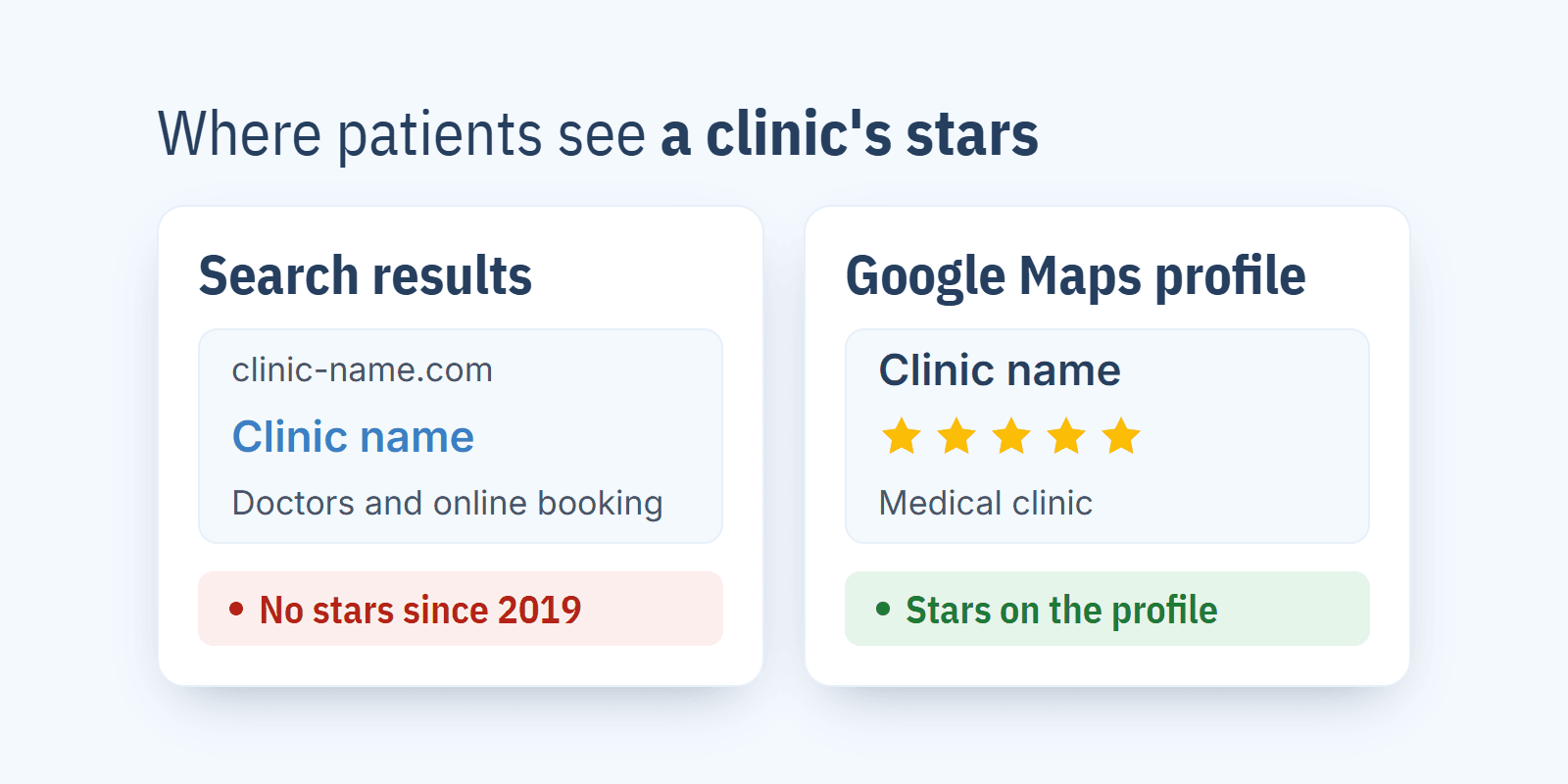
You can show Google reviews on a clinic website in 4 ways: a button that links to your reviews on Google, an embedded Google map with the clinic's rating, a widget that pulls reviews from your Business Profile, or a screenshot. Either way, you won't see those review stars next to your site in search results, because Google hasn't shown them there since 2019.
I run Repto, which helps medical practices collect Google reviews, but showing them on your website is a separate job, and each of these methods works without us. I cover how clinics collect reviews day to day, and what to do with negative ones, in my guide to Google reviews for medical practices.
How do you add Google reviews to a clinic website?
- 1.
A button that links to your reviews. The site has two buttons: "See our Google reviews", which opens the clinic's profile in Google Maps, and "Leave a review", which goes straight to the star-rating form. I show where to get that second link in my guide to the Google review link and QR code.
- 2.
An embedded Google map. In Google Maps you search for the clinic, click "Share", then "Embed a map", and paste the copied HTML code into your contact page. The map shows the clinic's name, its rating and the number of reviews, and Google updates them automatically.
- 3.
A review widget. A third-party service connects to your Business Profile, pulls the reviews and shows them on your site as a list or a carousel, with stars, author and date. You paste a short snippet into the page (in WordPress, into a "Custom HTML" block) or install a plugin.
- 4.
A screenshot. An image with a few reviews, added to the page like any other picture.
Widget, map or screenshot: which should you choose?
For most clinics, a map on the contact page and two buttons are enough. They cost nothing and work straight away. A patient who wants to read reviews will go to Google anyway, and there they'll see all of them, along with the clinic's replies.
A widget makes sense when patients book mainly through the website (for example, they arrive from an ad and should decide without leaving the page) and when the clinic gets new reviews every week. Fresh reviews then sit right next to the booking button, which is exactly where the patient hesitates.
I'd keep screenshots for flyers or presentations. On a website, after a few months they show old dates, and the text in an image can't be read by Google or by a screen reader. On a phone, the patient often can't read it either, because the image is too small.
Why does my widget keep showing the same old reviews?
Usually because of where it gets its data. A widget that uses Google's public data (the Places API) receives at most 5 reviews, sorted by relevance (Google Maps Platform documentation), so it can show the same five for months. A widget meant to show all reviews, newest first, pulls them through the account of the profile's owner or manager. So before you buy, check two things in the free trial: how many reviews the widget pulls, and whether the newest review on your profile is at the top.
The second cause is on the clinic's side: there simply are no new reviews. A Repto analysis of 653 public Google Business Profiles of medical practices in Kraków, Poland (as of 20 October 2026) shows that a typical profile gets 1 new review a month. At that pace, the oldest of the 5 newest reviews is already almost six months old, and on a home page a review like that looks as if nobody had visited the clinic for half a year. A large number of reviews doesn't change this: before a clinic in Wrocław, Poland, that had 1,162 reviews started asking patients for reviews, it got one new review in 12 days.
What rules does Google set for showing reviews on your website?
You can show Google reviews on your own website, as long as you show the source and the author. Widgets built on Google Maps Platform have to meet a few conditions (Places API policies):
the author next to every review: their Google profile name, or at least their profile photo when space is short;
the Google Maps logo in a visible place next to the reviews, if they aren't shown on a Google map;
a link to each review in Google Maps, so the patient can check the original;
information on how the reviews are sorted and filtered;
a label on machine-translated reviews, with access to the original;
review content loaded from Google, not copied to the provider's server.
A decent widget handles this itself, so when you choose one, check in the free trial that it shows the Google logo and a link to the original. With a screenshot, it's all on you: Google requires the source attribution (the logo or the words Google Maps) to sit right next to the Google Maps content and forbids cropping it out of a screenshot (Google's Maps guidelines).
Can you show only 5★ reviews on your website?
Technically yes, because most widgets let you hide reviews below a chosen rating. A widget built on Google Maps Platform data then has to state that the reviews are filtered. A patient who goes on to Google will see the lower ratings anyway: the same analysis of Kraków profiles shows that on average ~20% of the 10 newest reviews are 1-2★.
What looks worst to a patient is the combination: nothing but five stars on the website, and a low review on Google with no reply at all. I'd set the widget to show reviews with text, rated 4★ and up, with an "All reviews on Google" button, and make sure every low review on Google has a reply. I've collected replies that respect patient confidentiality in the Google review response templates.
At medical practices, some patients describe their treatment in their review. They wrote it publicly themselves, but for the home page I'd pick reviews about the service and the doctors, and leave the ones about diagnoses on Google.
Why don't review stars show next to my website in Google results?
Because Google doesn't show stars for reviews a business publishes about itself on its own website. It introduced this rule on 16 September 2019 (Google Search Central blog) and calls such reviews "self-serving". The rule covers every business and clinic that shows reviews about itself, including through a third-party widget (Google's review snippet documentation).
The same documentation forbids carrying ratings from other sites over into structured data. That's why rating markup in structured data (AggregateRating) with your Google rating won't bring you stars, and if your structured data breaks the guidelines, Google can apply a manual action, a penalty after which the page loses its rich results (structured data guidelines).
Patients see a clinic's stars elsewhere: on its profile in Google Maps and in local results. That's where the rating and the number of reviews affect how high the clinic appears (Google Business Profile Help). Reviews on your website have a different job: to convince a patient who has already landed there.
Does a review widget slow down the website, and what about GDPR?
It can, because a widget is a script from the provider's server: extra files and fonts. On a phone with a weak signal, the patient then waits longer for the whole page. Three things help:
the widget further down the page, below the fold, loaded only when the patient scrolls to it;
3-6 reviews instead of 50;
a test in PageSpeed Insights before and after adding the widget.
Through that script, the widget provider receives visitors' IP addresses, and some widgets set cookies. That's why the widget provider, like an embedded Google map, should be listed in the site's privacy policy, and its cookies in the consent banner. Usually the person or agency that runs the website takes care of this.
Where on a clinic website should reviews go?
Where the patient makes the decision:
next to the booking button, on the home page and on the booking page;
on the doctors' pages: reviews in which patients mention that doctor (many widgets filter reviews by keyword, for example the doctor's surname);
on the contact page: the map with the clinic's rating;
on the page your ads point to.
A separate "Reviews" tab in the menu is the weakest spot, because the only people who land there were looking for reviews anyway.
What will a widget show if you get few new Google reviews?
Not much, because a widget only brings what's on Google to your website. What I hear most often from clinics is that angry patients remember to leave a review and happy ones forget, so reviews come in regularly only once the clinic asks for them after every visit.
MultiClinic collected 591 new Google reviews in 5 months of regular requests and raised its average from 3.7 to 4.6-4.8.
The day after the visit, Repto sends the patient an SMS asking them to rate the visit, and points a satisfied patient to the Google review form. A patient who gives the visit a low rating writes to the clinic directly first, and the manager gets an email and can call back before the problem reaches Google.
The free Google review calculator shows how many 5★ reviews stand between your clinic and a higher average. If you have questions about collecting reviews, book a short call with us.
Frequently asked questions
Does adding Google reviews to a website cost anything?
A button with a link and an embedded Google map are free. Widgets usually run on a subscription, and free plans come with limits, such as a cap on the number of reviews shown or the provider's logo under the widget.
How do I add Google reviews to a WordPress site?
With a Google reviews plugin from the WordPress plugin directory, or with the widget code pasted into a "Custom HTML" block. With a plugin, check the same things as with a widget: whether it shows the newest reviews, the Google logo and a link to the original.
Will reviews on my website improve the clinic's position on Google?
What affects your position in Google Maps is the reviews on your Business Profile, however many of them you show on your website. The job of reviews on your site is to help the patient decide.
Why did my widget stop showing reviews?
Most often the subscription has expired or the widget's connection to the Google account has broken. Another common reason is a change to the profile, for example after a move or after merging duplicates, while the widget is still looking for the old one. After a profile change, reconnecting it in the provider's dashboard helps.
Can I fix a typo in a review on my website?
No. A review on your website should be exactly the same as on Google, because the patient can click through and compare. Typos stay, and a review that breaks Google's rules is something you report to Google, as I describe in the guide to removing a Google review.